Why bcrypt.compare() Returns False (and How to Fix It)
Login failing even with the right password? Work through the real reasons bcrypt compare returns false in Node, PHP and Python, with a fix for each.
You type the right password, bcrypt.compare() says false, and the login fails. Before you suspect bcrypt itself, know this: the algorithm is deterministic. Given the same password bytes and the same stored hash, it always gives the same answer. When a correct password fails, something changed the password, the hash, or the way they reach compare().
This guide works through the causes in the order they usually turn up, each with a quick way to confirm it and a fix. Every example was run against the current bcrypt and bcryptjs packages for Node.js, PHP's password_verify() and Python's bcrypt library.
Start with a two-minute triage
Run these two checks before reading any further. Between them they tell you whether the problem is in your code or your data.
1. Does compare work at all? Hash a throwaway password and compare it straight away:
const bcrypt = require('bcryptjs') // or require('bcrypt')

const fresh = await bcrypt.hash('test-password', 10)
console.log(await bcrypt.compare('test-password', fresh)) // should print true
If this prints false, the problem is in how you call the library (causes 1–4 below).
2. What does the stored hash really look like? Print it with JSON.stringify so invisible characters show up, along with its length:
console.log(JSON.stringify(user.passwordHash), user.passwordHash?.length)
// healthy: "$2b$10$...", 60
A healthy bcrypt hash is exactly 60 characters and starts with $2a$, $2b$ or $2y$. Anything else points at your data (causes 5–7). Delete these debug lines once you're done; never log the password itself.
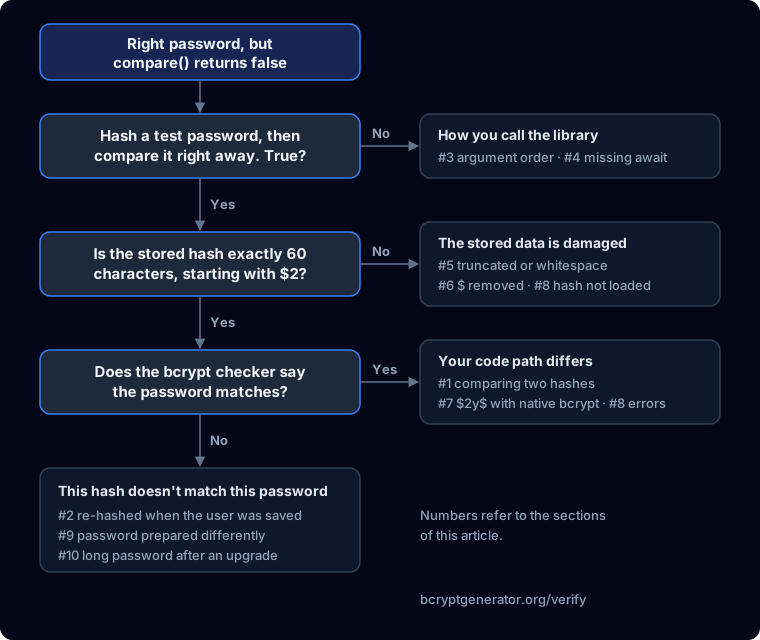
You can also paste the stored hash and the password into the bcrypt checker. If the checker says they match but your app says they don't, your code is the problem. If the checker says they don't match either, the stored hash or the password is not what you think it is.
1. You're comparing hashes instead of calling compare
This is the most common mistake in new code. Every call to hash() generates a fresh random salt, so hashing the same password twice gives two completely different strings. Both are valid, and they will never be equal.
// Wrong: a new salt each time, so this is never true
const loginHash = await bcrypt.hash(password, 12)
if (loginHash === user.passwordHash) { /* never runs */ }

// Right: compare re-hashes the password with the salt stored in the hash
if (await bcrypt.compare(password, user.passwordHash)) { /* logged in */ }
The same applies in other languages. In PHP, use password_verify($password, $hash) rather than comparing against a new password_hash(). In Python, use bcrypt.checkpw() rather than comparing against a new hashpw(). If you're unsure why each hash is different, the bcrypt checker's hash anatomy shows where the salt is stored.
2. The hash was hashed again when you saved the user
If logins work right after sign-up but fail after the user edits their profile, this is almost certainly the cause. A "hash the password before save" hook runs on every save, so when an unrelated field changes, the existing hash gets hashed a second time. The stored value is now hash(hash(password)), and no password will ever match it.
In Mongoose, guard the hook with isModified (see Mongoose's middleware docs):
userSchema.pre('save', async function () {
  if (!this.isModified('password')) return
  this.password = await bcrypt.hash(this.password, 12)
})
We tested both versions against a real MongoDB instance. Without the guard, the login worked after sign-up and failed as soon as the user changed their display name. With the guard, it kept working. The same trap exists in any ORM with save or update hooks (Sequelize, TypeORM, Prisma middleware), so check that your hook only hashes when the password field itself changed.
Users whose hashes were double-hashed can't be fixed in the database. Once you've deployed the guard, they need a password reset.
3. The arguments are in the wrong order
Each library takes the plain password first and the stored hash second:
| Language | Correct call |
|---|---|
Node.js (bcrypt, bcryptjs) | bcrypt.compare(password, hash) |
| PHP | password_verify($password, $hash) |
Python (bcrypt) | bcrypt.checkpw(password_bytes, hash_bytes) |
Swap them and Node's libraries and PHP quietly return false. Python is more helpful and raises ValueError: Invalid salt, because it tries to read your password as a hash.
4. A missing await
bcrypt.compare() returns a Promise when you don't pass a callback. Forget the await and you're no longer testing a boolean:
const ok = bcrypt.compare(password, user.passwordHash) // missing await
if (ok === true) { /* never runs: ok is a Promise */ }
The opposite version is worse. if (bcrypt.compare(...)) without await is always true, because a Promise object is truthy, so every password is accepted. We confirmed this with a deliberately wrong password. If your login seems to reject everyone, or accept everyone, look for a missing await first. TypeScript in strict mode catches both mistakes at compile time: the === true check fails with error TS2367 ("This comparison appears to be unintentional"), and the bare if with TS2801 ("This condition will always return true").
5. The stored hash isn't what bcrypt wrote
If the triage showed a hash that isn't exactly 60 clean characters, the data was changed somewhere between hash() and your database. In our tests, every one of these returned false (or, in Python, raised an error):
-
A column too short. A
VARCHAR(50)column either rejects the hash (MySQL strict mode) or silently cuts it (non-strict mode), and even one missing character means it never verifies. UseVARCHAR(255)in MySQL ortextin PostgreSQL, which also leaves room if you later switch to a longer algorithm such as Argon2id. Our bcrypt hash length guide covers both databases. Find damaged rows with:SELECT id, LENGTH(password_hash) FROM users WHERE LENGTH(password_hash) <> 60;Truncated hashes can't be repaired. Widen the column, then ask those users to reset their passwords.
-
Whitespace or a newline. Hashes copied from a terminal or read from a file often carry a trailing
\n. Trim the stored value. -
Python bytes saved as text.
bcrypt.hashpw()returnsbytes. Savingstr(hashed)stores the literal textb'$2b$12$...', andcheckpwlater fails withValueError: Invalid salt. Decode before saving and encode before checking:hashed = bcrypt.hashpw(password.encode(), bcrypt.gensalt()) user.password_hash = hashed.decode() # store a normal string bcrypt.checkpw(password.encode(), user.password_hash.encode())
6. The $ signs were eaten by your environment
A bcrypt hash is full of $ characters, and plenty of tools treat $something as a variable. That matters when you keep a hash in a config file, for example a seeded admin password.
-
Shells. In double quotes,
"$2b$10$..."is expanded by the shell. In our test, bash turned a 60-character hash into two characters. Use single quotes. -
.envfiles with variable expansion. Plaindotenvleaves the hash alone, butdotenv-expandcut it down to$2b$10, even inside single quotes. Next.js expands variables in.envfiles too, and its documentation says to escape a literal$as\$:ADMIN_PASSWORD_HASH=\$2b\$12\$RB2qR6GI4quP.PUs6xR5He37dCyunLcYFzlvUfwSX41XkRXgOQ3OSOnly use the escaped form with a loader that expands variables. Plain
dotenvwould keep the backslashes. -
Docker Compose interpolates
$indocker-compose.yml. Write each$as$$(Compose interpolation reference).
Whichever loader you use, print the length of the value your app actually receives. It should be 60.
7. A PHP hash checked with Node's native bcrypt package
PHP's password_hash() produces hashes that start with $2y$. In our tests, the native bcrypt package for Node.js (version 6.0.0) returned false for a genuine PHP hash, while bcryptjs and Python's bcrypt both verified it. $2y$ and $2b$ produce identical hashes, so you can safely normalize the prefix before comparing:
const normalized = storedHash.replace(/^\$2y\$/, '$2b$')
const ok = await bcrypt.compare(password, normalized)
Alternatively, switch to bcryptjs, which accepts all three prefixes. The reverse direction works without changes: PHP's password_verify() verified hashes made in Node. Laravel is the exception: by default it rejects $2b$ hashes with "This password does not use the Bcrypt algorithm", which our PHP and Laravel guide explains how to fix.
8. The hash was never loaded
Many apps hide the password field by default, for example select: false in a Mongoose schema or hidden attributes in other ORMs. Your login query then returns a user whose hash is undefined. Both Node libraries throw rather than return false (data and hash arguments required from bcrypt, Illegal arguments: string, undefined from bcryptjs). If your login handler catches errors and treats them as "wrong password", it looks exactly like compare returning false.
Ask for the field explicitly in the login query with select('+password'):
const user = await User.findOne({ email }).select('+password')
Also log the error you catch, not just a generic failure. Silent catch blocks hide this cause and several others.
9. Sign-up and login process the password differently
bcrypt compares bytes, so anything that changes the password on one side only breaks verification. A trailing space, a trailing newline, or one code path that trims input while another doesn't will all make compare return false. So will a pepper or a SHA-256 pre-hash added at sign-up but not at login (or the other way round), and so will Unicode normalization applied in only one place.
Put the password preparation in one function and call it from both sign-up and login, so the two can't drift apart.
10. Long passwords and library upgrades
bcrypt only reads the first 72 bytes of a password. Older libraries silently ignore the rest. In our tests with Node's bcrypt and bcryptjs, a password with extra characters after 72 bytes still matched. Newer libraries refuse long input instead: Python's bcrypt 5.0.0 raises ValueError: password cannot be longer than 72 bytes in both hashpw and checkpw (changelog), and Spring Security now throws for passwords over 72 bytes after fixing CVE-2025-22228.
So a user with a long password, often from a password manager, can be locked out right after a dependency upgrade even though nothing else changed. If logins started failing after an upgrade, check how long the affected users' passwords are in bytes. Our guide to bcrypt's maximum password length shows what each library does and how to upgrade without locking anyone out, and our comparison of bcrypt and Argon2 covers how Argon2id avoids the limit.
A myth: "the salt rounds must match"
You'll see this advice in forum answers and even some guides. It's wrong. compare() doesn't take a cost parameter. It reads the cost and salt from the stored hash itself. In our tests, hashes created at cost 4, 10 and 12 all verified with the same compare() call. Changing your cost setting only affects new hashes. See how many bcrypt rounds to use for choosing that number.
Mixing libraries isn't a problem either. Hashes made by bcrypt verified in bcryptjs, and the other way round.
Checklist
When bcrypt.compare() returns false for a password you know is right:
- A fresh hash-then-compare test returns
true - You call
compare/password_verify/checkpw, and never compare two hashes - The save hook only hashes when the password changed
- Arguments are in the order (password, hash)
- Every
compare()is awaited - The stored hash is exactly 60 characters, with no whitespace and no
b'...' - Hashes in env and config files survive
$expansion -
$2y$hashes are normalized if you use Node's nativebcrypt - The login query actually loads the hash field
- Sign-up and login prepare the password the same way
- No user's password is over 72 bytes after a library upgrade
Still stuck? Paste the stored hash into the bcrypt checker together with the password. It tells you in seconds whether the problem is the data or the code. For a full walkthrough of hashing and verifying in your stack, see the Node.js, PHP and Python guides.
Drafted with AI assistance; reviewed and tested by Shahzeb Zafar.
Ready to try it?
Open Bcrypt Generator →Related Articles
Bcrypt Hash Length: How to Store It in MySQL and PostgreSQL
A bcrypt hash is always 60 characters. Learn the right column type for MySQL and PostgreSQL, why VARCHAR(50) breaks logins, and how to fix a truncated column.
Can You Decrypt a Bcrypt Hash? No, and Here Is What Works Instead
Bcrypt hashes can't be decrypted, online or with the salt. See what "bcrypt decrypt" sites really do, and how to check, reset or migrate passwords instead.
Bcrypt Max Password Length: The 72-Byte Limit Explained
Getting "ValueError: password cannot be longer than 72 bytes"? Bcrypt only uses the first 72 bytes. Tested fixes for Python, passlib, FastAPI, Node and PHP.